Your instruments, effects, and routes

Choose the sound. Patch the signal.

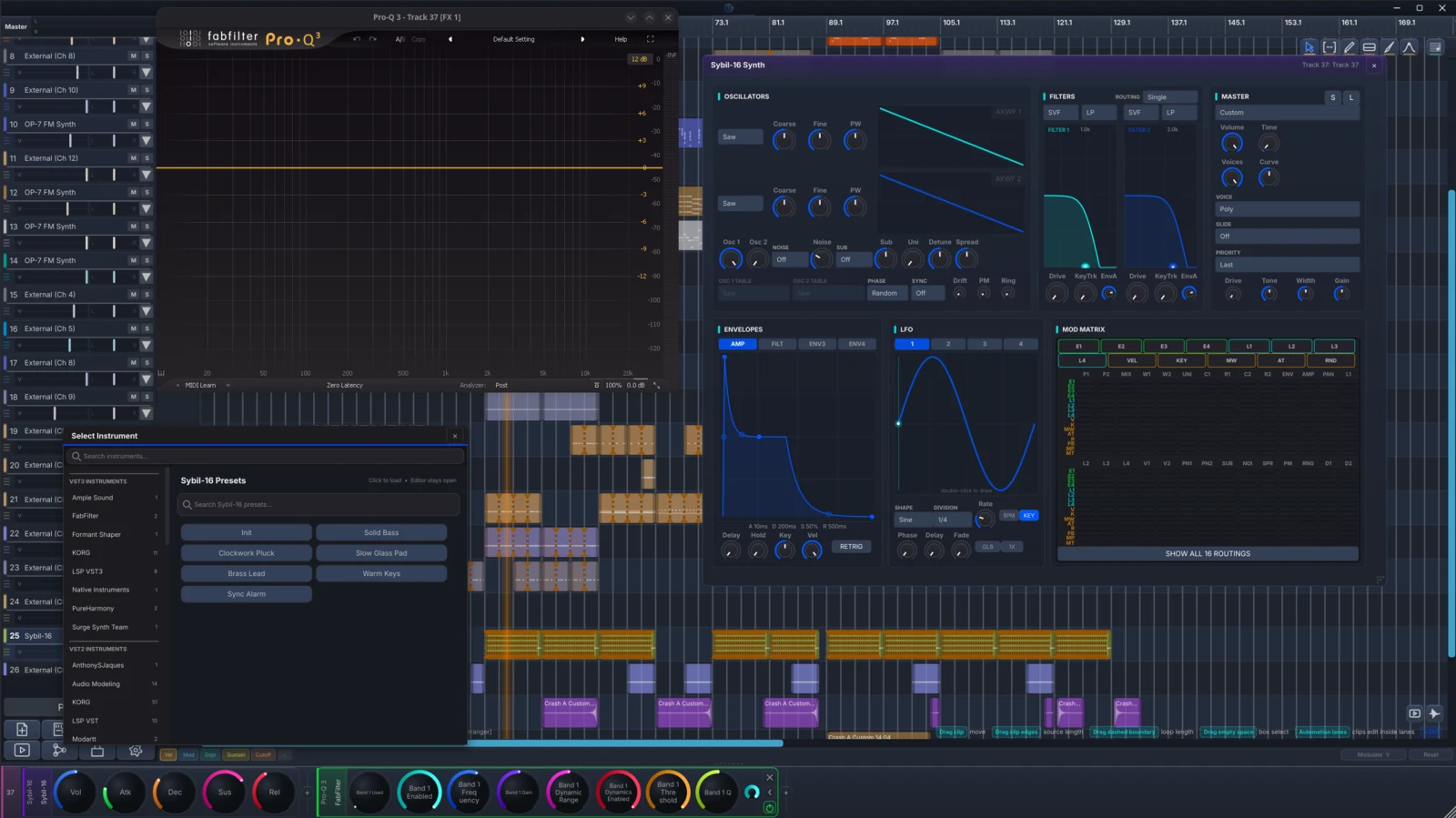
Load OP-7, Sybil-16, SoundFonts, SFZ libraries, or your own VST3 and CLAP plug-ins. Then route audio, MIDI, and modulation across the session without leaving the project.

DonutStudio arrangement with the Sybil-16 synth, instrument browser, and a hosted FabFilter Pro-Q 3 VST3 effect open
Included on every track

Open the project and the sound comes back.

Load a built-in instrument or a hosted VST3/CLAP device, add effects, and save the chain with the project. Add-ons give you more instruments and let you patch beyond a single track.

  • Native and hosted devices
  • Track effect chains
  • Project recall
Instruments & Effects

Load built-in instruments, your own plug-ins, and the effects you want on each track.

Instruments & EffectsFREE

Built-in Synths

FM precision and analog movement, built in.

Move between six-operator FM and a modulation-rich virtual-analog instrument while keeping every track inside the same project and tuning system.

Included with DonutStudio Free
Inside the workflow

FM, virtual analog, and sampled instruments in one browser

Move between OP-7, Sybil-16, SoundFont, and SFZ sounds while the track keeps its notes, tuning, and project role.

  1. OP-7Six-operator FM
  2. Sybil-16Modulation-rich virtual analog
  3. LibrariesSF2 · SFZ · hosted instruments

Search across sources

The browser keeps bank, library, and instrument identity visible while filtering.

Editors stay connected

Built-in synth editors open for the selected track and update the authoritative engine.

Tuned at playback

Every instrument follows the harmonic relationships in the piano roll.

Instruments & EffectsPRObeta

Vocal Synth

Write the singer as part of the arrangement.

Type lyrics onto notes, shape expression, and render DiffSinger or UTAU voices that follow the same tuning relationships as the rest of the piece.

Inside the workflow

Lyrics become a performed, tuned voice

Write lyrics on notes, inspect phonemes, shape vibrato and transitions, then render a local singing engine into the arrangement.

  1. WriteNotes + lyrics + phonemes
  2. PerformVibrato · glide · expression
  3. RenderDiffSinger · UTAU · resynthesis

Per-note performance

Vibrato depth, period, fades, portamento, and expression remain editable per note.

Local generation

Installed voices render on the machine and publish progress back to the track.

The singer follows the graph

Rendered pitch is derived from the same harmonic relationships as the instruments.

Instruments & EffectsFREE

Airwindows Effects

Hundreds of Airwindows effects, already in the rack.

Search the bundled Airwindows catalog by name or category, add an effect, and automate its parameters.

Included with DonutStudio Free
Inside the workflow

Hundreds of processors, one searchable rack

Browse Airwindows by category, insert a processor into the selected chain, and automate its real parameters in the project.

  1. BrowseDynamics · color · space
  2. InsertTrack · master · sample
  3. ShapeNamed parameters + automation

A real catalog

Search the bundled collection by category, processor, or name.

Stable effect identities

Automation remains attached when effects are reordered in the chain.

Sidechain-aware

Compatible effects can take another track as a sidechain source.

Instruments & EffectsFREE

Donut Effects

The everyday effects DonutStudio needs.

Add DonutStudio's native EQ, dynamics, delay, modulation, utility, and mastering tools. Their settings save with the project.

Included with DonutStudio Free
Inside the workflow

Native processing that speaks the project language

Build a compact native chain for tone, movement, and control, then route automation and modulation to the parameters that matter.

  1. SourceInstrument or audio track
  2. ChainNative Donut processors
  3. ControlAutomation + modulation

Fast project recall

Native devices load directly with the project and remain ready in every session.

Graph-addressable

Parameters can become modulation destinations in the same session graph.

Clear chain ownership

Use processors at track, master, or per-sample level where supported.

Modular

Build instruments, effects, and session routing as connected graphs.

ModularFREEbeta

Patch Bay

Patch the whole project from one place.

Connect tracks, instruments, effects, hardware, and control signals in one readable Patch Bay.

Included with DonutStudio Free
Inside the workflow

The whole project becomes a readable Patch Bay

See tracks, instruments, effects, hardware, and parameter destinations together, then connect the route you want.

  1. SourceClock · note · LFO · audio
  2. RouteControl · audio · frame · score
  3. TargetAny routable session parameter

Any-to-any modulation

Enumerate live destinations and create a source-to-parameter route in one step.

Stable device portals

Reference a track instrument or effect through a structure node that survives ordinary editing.

Visible resolution state

Routing badges distinguish live, parked, missing-target, and unsupported destinations.

ModularFREE + PRObeta

Instrument & Effect Grids

Build your own instrument or effect.

Use Instrument Grid for instruments and Effect Grid for effects. Patch control, audio, modulation, and hosted devices inside the project.

Inside the workflow

Build an Instrument Grid or Effect Grid

Patch oscillators, control sources, processors, and hosted devices into an instrument or effect that remains editable inside the project.

  1. GenerateOscillator · sampler · hosted input
  2. ModulateLFO · envelope · note follower
  3. OutputInstrument or effect patch

Readable ports

Nodes expose typed control, audio, frame, and score carriers on every wire.

External devices can join

Hosted VST3 and CLAP devices can sit inside the patch as crash-isolated nodes.

Patch remains editable

The serialized graph, node positions, parameters, and edges stay with the track.